> For the complete documentation index, see [llms.txt](https://helpdesk.getfly.vn/llms.txt). Markdown versions of documentation pages are available by appending `.md` to page URLs; this page is available as [Markdown](https://helpdesk.getfly.vn/web-version/interactive-blocks/questions-about-the-customer-module.md).
# Questions about the Customer Module
## Question 1: How is the interaction count on the customer detail page calculated?
* Creating a new customer counts as 1 interaction.
* Email: Only successfully sent and read emails are counted.
* Tasks: Tasks related to the customer that have not been canceled are counted.
* SMS: Only successfully sent SMS messages are counted.
* ZNS (Zalo Notification Service):
\+ 1 interaction for each successfully sent ZNS message.\
\- 1 interaction if a successfully sent ZNS message is deleted.
* Calls: Outbound calls successfully made to the customer are counted.
* Comments: Comments posted in the "Discussion" section (not logs) are counted.
* Email Link Clicks: Tracked when a link in a successfully sent email is clicked.
Note: If a comment was counted and later deleted, the interaction count remains unchanged. Interaction counts are refreshed every hour.
***
## Question 2: What is a customer’s "Last Contact Date" and how is it calculated?
\
"Last Contact Date" refers to the date of the most recent interaction with a customer. It is updated automatically by the system when:
1. You manually update the date on the customer detail page via the "Update Last Contact Date" feature.
2. The customer reads an email or clicks a link in an email.
3. A system message is sent to the customer.
4. The customer answers a phone call.
5. You create a Sales Order, Quotation, Contract, or Receipt Voucher.
6. A task marked as "Appointment" (task type: MEETING) is completed.
7. You make a phone call to the customer.
8. Any activity is recorded via the Customer Care Schedule.
## Question 3: What does the "New Updated" section on the customer list screen mean?
This section displays customers with new unread comments in their "Discussion" tabs.\
Customers are sorted by creation date, with the newest at the top.\
The red badge indicates the number of unread comments, not the number of customers.
## Question 4: How can I filter customers with the highest revenue on Getfly?
To filter high-revenue customers within a specific period:
1. Go to "Customer List" → "Filter" → "Purchase Information".
2. Set Order Status to "Purchased".
3. Add filters like:
* Purchase Time
* Order Type (Sales/Purchase)
* Product Group or Product
* Quantity
* Order Value or Total Purchase Value
* Number of Orders or Total Revenue
* Total Interactions
Example: To filter customers with total purchase value ≥ 20 million VND in 2024:
* Filter by: Purchase Time = 01/01/2024 to 31/12/2024
* Order Type = Sales Order
* Total Purchase Value ≥ 20,000,000 VND
**Note**: The customer list reflects filters applied for purchases, but columns like Total Revenue still show lifetime values.
***
Question 5: How can I bulk edit customer information on Getfly?\
Use the "Customer Data Overwrite Upload" feature:
-------------------------------------------------
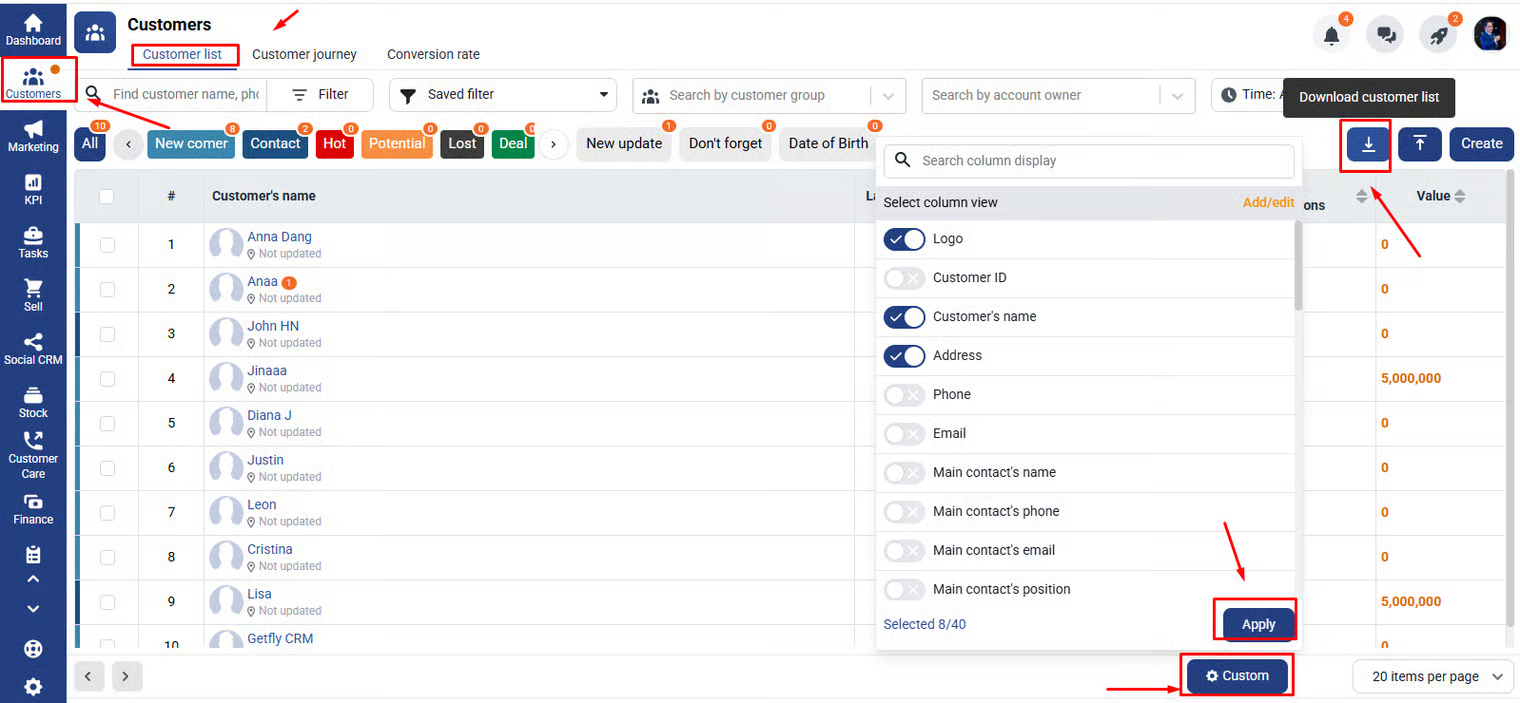
1. Download the customer list with selected columns and the Customer ID.
2. "Edit the Excel file: only keep Customer ID and columns to be updated.
3. "Upload" the file → Preview Data → Check "Overwrite Data if IDs Match" → Upload.
**Tips:**
* Max rows: 2,000; File size: 5MB
* Back up data before uploading
* You can only update referral information for new or unassigned customers
* System-generated fields (e.g., Total Interactions, Value) can't be overwritten
## Question 6: How to filter and download customers in campaigns?
You must have the "Download Customer" permission and be a "Relevant Person" in the campaign.
**Method 1: From Customer List screen**
* Go to "Customers" → "Customer List" → "Filter" → "Advanced Search" → "Campaign"
* Apply additional filters (e.g., Opportunity Status)
* Click the download icon to export
**Method 2: From Campaign Detail screen**
* Open the campaign → Click "Settings" → "Download Customers"
"Note": You must be the campaign manager to access this button.
***
## Question 7: Can I create multiple business sectors at once?
Yes. With CRM Settings permission:
1. Go to "Settings" → "CRM Configuration" → "Customers" → "Business Sector"
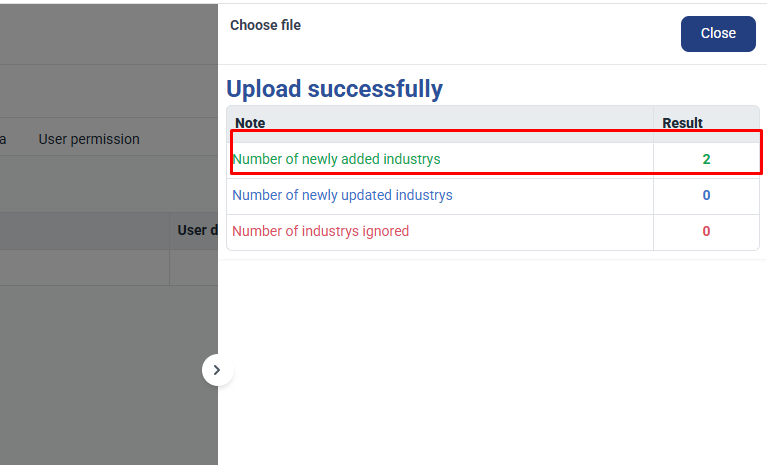
2. Click "Upload Business Sector", download the template, and fill it in.
3. Upload the completed file → Overwrite if needed → Confirm.
***
## Question 8: Does Getfly support syncing phone contacts?
Yes. Steps:
1. Open "Getfly App" → "Customers" → "Add New Customer" → "Sync Contacts"
2. Select contacts → Click "Next" → Assign responsible person → "Sync Now"
"Notes":
* Each phone contact can only be synced once
* Requires both Name and Phone Number
* System prevents duplicates by checking existing phone numbers
***
## Question 9: How to assign customers to employees?
### Method 1: During Excel upload
Fill "Responsible Person" column or assign in Step 3: Check Data
### Method 2: On Customer Management screen
* Select customers → Click "Assign Responsible Person" → Choose employees → Click "Update"
### Method 3: By Campaign
* Add customers to a campaign
* The assigned opportunity owner becomes the customer manager
* Can be automated via Marketing Automation
"Note": If the campaign auto-distributes opportunities, customer managers will also be auto-assigned
***
## Question 10: Can I partially update customer data (e.g., phone number only)?
Yes. Use the data overwrite upload:
1. Download customer data with Customer Code
2. Keep only Customer Code and data to be updated
3. Upload → Preview → Overwrite
Tips:
* Separate multi-select values with commas
* Max 2,000 rows/file, 5MB limit
* Fields like Total Interactions and Last Contact are system-calculated and cannot be changed
***
## Question 11: Why can’t I see customer data after transferring responsibility?
After transfer, the old responsible person loses access.
To keep access:
* Uncheck "Remove old responsible person from viewer list" during transfer
* Or, manually re-add the person to the viewer list
***
## Question 12: Can a customer have multiple responsible employees?
No. In Getfly CRM, each customer can only have "one" person responsible at a time.